Amazon Product Photography Is Your Highest-Leverage Investment
On Amazon, your images are your entire sales pitch. Before a customer reads a single bullet point, they've judged your product and brand based on your photography. High-performance amazon product photography isn’t about looking nice; it’s a calculated visual strategy designed to dismantle buyer objections and win sales. Weak images guarantee weak results.
Your Images Are Your Top Salesperson

Think of your product images as your highest-performing, 24/7 salesperson. They work tirelessly to stop the scroll in crowded search results, communicate value in seconds, and persuade shoppers to click “Add to Cart.” While you're optimizing copy and bidding on keywords, your images are doing the heaviest lifting.
Copy sells second. The initial decision to click, engage, or keep scrolling is almost entirely visual. That split-second judgment determines whether a shopper even gives your bullet points and description a chance.
The Psychology of a Click
In Amazon's zero-sum game, professional product photography is the primary lever for growth. Data consistently shows that images are the number one factor influencing purchase decisions. More info on how professional photography directly impacts sales can be found at https://azprodshots.com/.
This psychological trigger is why strategic visuals are non-negotiable. They are a direct line to the metrics that actually matter:
- Higher Click-Through Rate (CTR): A compelling main image stops the scroll and earns the click. This is the entry point to your entire funnel.
- Increased Conversion Rate (CVR): A strategic image stack answers questions, handles objections, and builds trust, turning browsers into buyers.
- Justified Premium Price: Professional shots signal quality and credibility. This allows you to command a higher price without shoppers flinching.
- Reduced Return Rates: When your images are clear and accurate, you set precise expectations. This minimizes the costly headache of returns from "not as described" complaints.
Moving Beyond a Checklist Item
Too many sellers treat their images as an afterthought—a box to tick after sourcing and logistics are handled. This is a massive, costly mistake. Amateur or generic photos instantly signal an amateur brand and erode credibility before you've even had a chance to make your case.
Your images aren’t just pictures of your product; they are persuasive assets engineered to dismantle buyer objections and build desire. Every single pixel must have a purpose.
Investing in a strategic visual presentation is the highest-leverage move you can make. When you improve your images, you improve everything. Your PPC campaigns become more efficient because clicks convert. Your organic rank climbs as sales velocity picks up. It's a force multiplier for your entire business.
Anatomy Of A High-Converting Image Stack
A winning Amazon listing treats its image gallery like a sales pitch, not a photo album. Each image slot has a specific job. Wasting even one on a repetitive or weak visual means you're leaving money on the table.
Your goal is to build a visual narrative that walks a shopper from a casual glance to a confident "Add to Cart."
It starts with your Main Image. Its only job is to stop the scroll and win the click on a crowded search results page. It must be a sharp, high-resolution shot of your product on a pure white background, filling at least 85% of the frame. Anything less is ignored by shoppers and risks being suppressed by Amazon.
Building The Narrative With Secondary Images
Once you’ve earned the click, the rest of your images must build trust and answer questions your customer hasn't even thought to ask yet. The real workhorses here are Lifestyle Images.
These shots put your product into a real-world context, letting customers see themselves using it. They bridge the gap between a static object and a solution to their problem. Marketplace data shows listings that use professional lifestyle photos can see conversion rates jump by up to 40%. In the first few seconds on your page, these images create an emotional connection that a white-background shot cannot.
Next are your Infographics. These aren’t pictures with random text; they are precision tools built to knock down specific buyer objections. Use them to visually call out key benefits, materials, or unique features you discovered during your competitor research and review mining.
A massive, conversion-killing mistake is cramming too much text into an infographic. On a mobile phone, it becomes an unreadable blur. Stick to one core benefit per image with a large, legible font and a clear icon.
Strategic Role of Each Amazon Image Slot
| Image Slot | Primary Goal | Key Elements | Common Mistake to Avoid |
|---|---|---|---|
| Image 1: Main | Win the Click | Pure white background, product fills 85%+ of frame, high resolution | Adding badges, text, or props; violating Amazon's ToS |
| Image 2: Lifestyle | Build Connection | Show the product in a relatable, real-world setting | Using fake-looking stock photos or unbelievable scenarios |
| Image 3: Infographic | Highlight Benefit #1 | One key feature translated into a clear customer benefit; icon + minimal text | Overloading with text; listing features instead of benefits |
| Image 4: Infographic | Address Objection #1 | Visually answer a common question (e.g., size, materials, compatibility) | Creating a text-heavy image that's unreadable on mobile |
| Image 5: Comparison | Show Superiority | Side-by-side chart showing your product's advantages over competitors | Being dishonest or making claims you can't back up |
| Image 6: Instructional | Demonstrate Ease-of-Use | Show how simple the product is to set up, use, or clean | Making the process look more complicated than it is |
| Image 7: Trust Builder | Reduce Purchase Risk | Showcase guarantees, certifications, packaging, or brand story | Using a generic photo that doesn't add new information or value |
This structured approach ensures that every single image is working to move the customer closer to a purchase.
Closing The Deal Visually
To seal the deal, your final images should be Comparison Charts and Instructional Shots. A good comparison chart makes the choice obvious, putting your product’s key advantages next to a competitor’s weaknesses. An instructional photo shows how easy your product is to use, answering setup questions before they arise and reducing purchase friction.
The entire visual sequence must be designed for mobile first. If a customer has to pinch and zoom to read your text, you’ve already lost.
Remember, your images are the tip of the spear, but they work best when your entire Amazon listing optimization strategy is firing on all cylinders.
Build Your Visual Strategy From Customer Data
Stop guessing what images will work. The highest-converting visuals aren’t born from creative brainstorming; they’re engineered from cold, hard customer data. This isn't about being artistic—it's about removing subjectivity to ensure every image is a strategic asset designed to drive sales.
Your competitors’ listings are a goldmine of this data. Their customer review sections—both positive and negative—are the most direct line you have into the mind of your target buyer. This is where you find the exact language people use to describe their problems, what they want, and what drives their purchase decisions. This intelligence is the foundation of a powerful creative brief.
Mining Reviews for Conversion Triggers
The process is simple but brutally effective. Pinpoint your top three to five direct competitors and dive straight into their one-star and five-star reviews. Ignore feedback about shipping and focus only on product-specific comments.
Create two lists:
- Pain Points & Objections (from negative reviews): What are the recurring complaints? Is the product smaller than expected? Does a specific part break? Are the instructions confusing? These are the exact objections your infographics must visually destroy.
- Desired Benefits & Use Cases (from positive reviews): What features do customers rave about? How are they actually using the product in their daily lives? This tells you precisely what to feature in your lifestyle shots to forge an emotional connection.
An image that visually proves your product won't fail the way a competitor's does is infinitely more powerful than a bullet point making the same claim. You're handling an objection before the customer even fully forms it.
This process ensures your Amazon product photography isn't just a gallery, but an active part of your sales funnel, systematically dismantling every point of friction.
Exploiting Competitor Visual Gaps
Once you know what customers truly care about, analyze your competitors' image stacks. Where are they weak? Are their infographics a mess on mobile? Do their lifestyle shots look like generic stock photos? Every weakness is an opportunity for you to dominate.
Look for the visual gaps. If a top complaint is about product size but no competitor shows a clear scale reference, that's your opening. Your second or third image should immediately feature the product next to a common object or have clear dimensions, instantly solving that known pain point. You can find more practical strategies on our product photography blog.
This diagram shows how a high-converting image stack built from this research is structured.
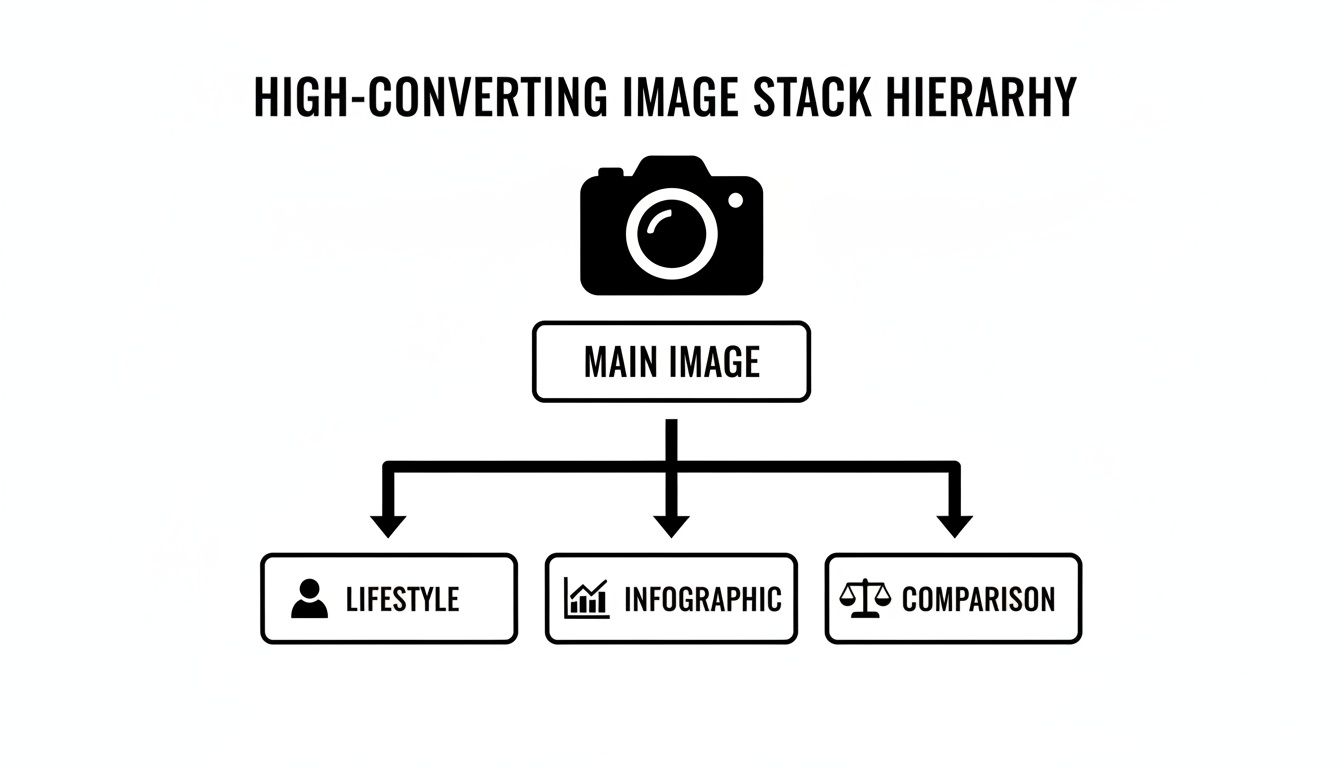
The flow is logical: grab their attention with the Main Image, then build trust and show undeniable value with lifestyle shots and data-driven infographics. By grounding your creative decisions in research, you turn your photography from a cost into a strategic investment.
Choosing Your Photography Execution Model
You’ve done the research and have a solid plan. Now for execution. How you produce your images will have a massive impact on your budget, timeline, and revenue. This isn't just another operational expense; it's a direct investment in your conversion rate.
The Do-It-Yourself (DIY) Approach
On the surface, DIY seems like the cheapest path. The hidden costs are huge.
Getting professional-looking shots isn't as simple as using your smartphone. It requires a proper camera, tripods, multiple lights, diffusers, and the technical skill to use them. Then comes post-production: hours in editing software getting that perfect white background, adding text, and correcting colors. Some affordable product photography tips can help, but the time sink is massive.
The biggest risk with DIY? You end up with photos that don’t sell. They might look "okay," but they lack the strategic edge to persuade a customer, making all that effort a waste.
Hiring a Traditional Photographer or Agency
So, you decide to hire a pro. This seems like the next logical step. You find a local photographer or a general marketing agency with an impressive portfolio.
Here’s the problem: their goals are misaligned with yours. A traditional photographer is trained to create beautiful, artistic images. A marketing agency is focused on a broad brand aesthetic. Neither is an expert in the brutal, data-driven world of Amazon conversions.
The most common pitfall when hiring a generalist is receiving a portfolio of stunning photos that are completely ineffective for Amazon. They may look great, but they fail to address the specific buyer objections and conversion triggers you uncovered in your research.
These pros rarely dig into customer reviews or analyze competitor listings. You end up paying a premium for pretty pictures that don't do the one job you need them to do: sell your product on Amazon.
Using a Specialized Amazon Service
This brings us to the third path: working with a service that lives and breathes Amazon product photography.
These specialists don't just take pictures; they build visual sales arguments. Their entire process is built around data-driven research. They start by mining reviews and dissecting competitor strategies to build a shot list 100% focused on increasing your conversion rate.
This model is built for performance. Every image has a specific job, whether it's crushing an objection, highlighting a benefit, or stopping the scroll. It’s the most direct and reliable way to turn your strategy into a set of high-performing assets. For sellers who value time and predictable ROI, this is the most effective option. You can see how an entire image package is structured and ordered with a conversion-first mindset.
Comparing Amazon Photography Execution Models
| Method | Best For | Average Cost | Pros | Cons |
|---|---|---|---|---|
| DIY | Sellers on a shoestring budget with significant time and existing photography skills. | $200 - $1,000+ (equipment) | Lowest cash outlay; full creative control. | Massive time investment; steep learning curve; high risk of poor, unprofessional results that hurt conversions. |
| General Agency/Photographer | Brands needing artistic photos for broad marketing (e.g., social media, website) alongside their Amazon listings. | $1,500 - $5,000+ | High aesthetic quality; professional polish. | Lacks Amazon-specific strategy; often misses conversion-critical details; expensive for images that may not perform. |
| Specialized Amazon Service | Sellers focused on maximizing conversion rate, ROI, and speed to market. | $500 - $2,500 | Research-driven process; built to convert on Amazon; efficient and predictable results; clear ROI. | May not be the best fit for purely artistic or brand-level creative projects outside of e-commerce platforms. |
If your primary goal is to sell more products on Amazon, a specialized service is the most direct path to getting visuals that actually work.
Technical Optimization For Mobile And SEO

Persuasive images are useless if they aren't technically optimized for Amazon's ecosystem. This isn’t about just meeting Amazon’s minimum requirements; it’s a competitive advantage that makes or breaks the customer experience, especially on mobile.
A simple win is strategic file naming. While Amazon renames files upon upload, there’s evidence the original file name is indexed and can provide a small SEO bump. Naming your main image brand-name-waterproof-bluetooth-speaker-main.jpg is a zero-cost best practice.
Designing For The Dominant Platform: Mobile
The vast majority of Amazon shoppers buy on their phones. This isn't a trend; it's the default. Designing your images for a desktop monitor first is a catastrophic and common mistake that kills conversions.
A mobile-first philosophy must drive every visual decision:
- Bold, Legible Text: Any text on an infographic must be huge. Can a customer read it instantly on a small screen without zooming? If they have to zoom, you've already failed.
- High-Contrast Visuals: Think simple icons, clean lines, and strong color contrast. Your message has to land in a split second.
- One Idea Per Image: A cluttered infographic becomes an incomprehensible mess on a phone. Each image needs to communicate a single, powerful benefit.
Your images are viewed on a screen that fits in someone's hand, usually while they're distracted. Your visual communication must be immediate, simple, and powerful to have any effect.
A/B Testing And The Power Of Video
Your main image is your single most critical asset. It directly controls your click-through rate (CTR) from search results. A tiny 2% lift in CTR can have a massive downstream effect on sales velocity and organic rank. Never assume your first choice is the best one.
Strategically A/B test different angles, product layouts, or subtle shadow effects on your main image using Amazon’s "Manage Your Experiments" tool. The data will tell you exactly which visual earns more clicks, removing guesswork from the equation.
Finally, the product video slot is a vital conversion tool. A solid video that shows the product in action, calls out key features, and reinforces brand quality can provide a serious lift in conversion rates for shoppers who are still on the fence.
Your Images Are a Business Force Multiplier
Thinking of world-class Amazon product photography as an expense is a fundamental mistake. It’s not a cost center; it’s your single most powerful investment—the ultimate force multiplier for your entire business.
Every other dollar you spend—on ads, inventory, or R&D—is either amplified or crippled by the quality of your visuals. It's that simple.
When your images convert better, your PPC campaigns become dramatically more profitable, driving down ACoS. The resulting spike in sales velocity signals Amazon's algorithm to boost your organic ranking, creating a powerful growth flywheel. This visual authority also lets you command a higher price and slash costly returns by setting crystal-clear expectations.
The message is direct: Before you pour more money into ads, inventory, or new product launches, fix your images. It is the highest-leverage action you can take to grow your Amazon business.
Optimizing your images is the foundational step that makes every other investment work harder. If you're not sure how your current visuals stack up, you can get an analysis and track your listing’s performance. It's time to put your most important salesperson to work.
Common Questions from Serious Amazon Sellers
Here are the questions that come up from sellers who are serious about making their listings work harder.
How Many Images Should I Use On My Amazon Listing?
Use all of them. Amazon gives you seven image slots for a reason.
Think of each slot as a salesperson with a specific job. Wasting one is like refusing to answer a customer's question. Your main image gets them in the door, but the other six must close the deal by showing benefits, crushing objections, and building trust. A full, strategically planned image stack isn't optional—it's your primary tool for beating the competition.
Can I Use My Smartphone For Amazon Photography?
You technically can, but it's a strategic mistake for any competitive product. The problem isn't just about megapixels or getting a perfect white background (RGB 255, 255, 255).
The real issue is that a phone cannot replicate the professional lighting, styling, and post-production that create images that sell. Professional photography isn't an expense; it's a direct investment in your conversion rate. It's what separates you from the dozens of other sellers using the same stock photos or DIY shots.
The most common—and most expensive—mistake is creating images that just 'show' the product. You end up with a gallery of basic pictures with no sales strategy behind them.
High-converting images are engineered. They are built from research into customer reviews and competitor weaknesses. They are not just pictures; they are carefully crafted arguments designed to prove your product is the only logical choice. When you treat them that way, your listing stops being a passive catalog page and starts acting like a 24/7 sales machine.
Stop guessing and start selling. ProductShots creates a complete, research-driven image stack for your Amazon listing, designed to convert from day one. Get your high-performance images.