Master Amazon Image Size Requirements: A Strategic Guide for Sellers
If you want your images to sell your product on Amazon, you have to get the technical details right. This isn't just about avoiding a suppressed listing; it’s about ensuring your images load fast, look sharp on every device, and allow shoppers to zoom in and scrutinize the details.
Getting this wrong means shoppers either see a blurry, unprofessional image or, worse, never see your listing at all. This is your definitive guide to the Amazon image specs that directly impact your conversion rate.
This quick overview covers the core technical pillars every seller needs to master: pixels, aspect ratio, and file format.
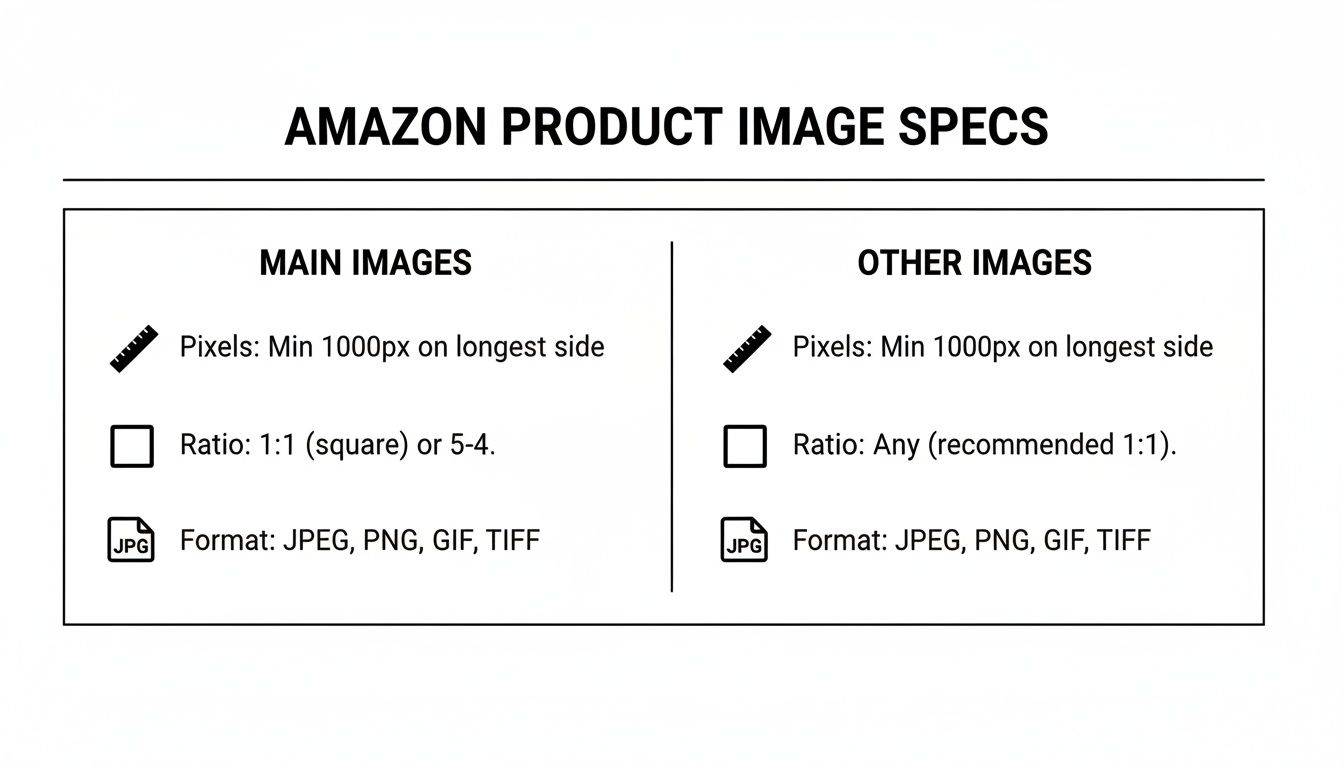
The biggest takeaway here? The gap between Amazon’s minimum requirement and what actually converts. Just meeting the bare minimum is a rookie mistake that costs sales. Images sell first; copy sells second. They are your primary lever for improving performance.
Core Technical Specifications
Nailing Amazon's technical standards is the price of entry. Fail here, and your images get rejected before a single customer sees them. These are the non-negotiable requirements for every image you upload.
- Pixel Dimensions: Your images must be at least 1,000 pixels on the longest side. To enable the critical zoom feature, however, they need to be at least 1,600 pixels. For maximum clarity and perceived quality, the standard is 2,000 x 2,000 pixels.
- Aspect Ratio: While Amazon technically allows various ratios, the 1:1 square aspect ratio is the only one that guarantees consistent, professional presentation. It prevents awkward cropping in search results, especially on mobile.
- File Format: JPEG (.jpg) is the optimal choice. It provides the best balance between high quality and small file size, ensuring fast page load times. While PNG, TIFF, and GIF are accepted, they create larger files that can slow down your listing.
- Color Mode: Always use sRGB. It is the standard for web. Uploading an image in CMYK (for print) will result in distorted, inaccurate colors online.
- File Size: Keep each image file under 10MB. Larger files negatively impact load time, harming the customer experience and potentially your search ranking.
To give you a quick reference, here’s a breakdown of the minimums versus what high-converting listings actually use.
Amazon Image Requirements At a Glance
| Specification | Amazon Minimum Requirement | Recommended Best Practice |
|---|---|---|
| Pixel Dimensions | 1,000px on the longest side | 2,000 x 2,000 pixels for maximum zoom and clarity |
| Aspect Ratio | Varies | 1:1 (Square) for consistent display everywhere |
| File Format | JPEG, PNG, TIFF, GIF | JPEG (.jpg) for the best quality-to-size ratio |
| Color Mode | sRGB | sRGB (No exceptions) |
| File Size | Under 10MB | Under 10MB, but aim for the smallest size without quality loss |
Following these best practices ensures you're not just compliant—you're positioned to compete effectively. High-quality images are a force multiplier that improves PPC efficiency, organic ranking, and even price tolerance.
"Data shows listings with zoom-enabled images (at least 1,600px) see up to 22% higher engagement rates, since customers can scrutinize textures, labels, and flaws without frustration. In major markets like the US and EU, where 85% of Amazon traffic is mobile, under-sized images under 1,000px get auto-rejected or display poorly, costing sellers dearly."
Getting these technical details right is foundational to building a listing that actually converts. As we often emphasize, the fundamental importance of high-quality media in digital advertising cannot be overstated.
Main Image vs. Secondary Images: A Tale of Two Strategies
On Amazon, your main image and your secondary images serve two completely different strategic purposes. Your main image is about strict, unforgiving compliance. Your secondary images are where you sell.
Confusing the two is one of the fastest ways to get a listing suppressed or kill your conversion rate.

Think of your main image—your "hero" shot—as the handshake that earns you a click from a crowded search results page. That’s its only job. Amazon’s rules are iron-clad here to enforce a uniform shopping experience. Break them, and your listing vanishes.
The Unbreakable Rules of the Main Image
Your main image must be surgically precise. This is not the place for creative flair. It's a technical passport photo for your product.
- Pure White Background: This is non-negotiable. The background must be pure, digital white—RGB (255, 255, 255). Off-white, light gray, or a studio backdrop with faint shadows will get your listing flagged by the algorithm.
- Product Only: The image must show only the product for sale. No props, no accessories that aren't included, and no lifestyle settings.
- 85% Frame Fill: Your product must occupy at least 85% of the total image area. This ensures it’s large and clear, especially on a mobile screen.
- Zero Text or Graphics: Absolutely no text, logos, watermarks, or badges like "Made in USA" or "New Arrival" are permitted.
The single most common reason for listing suppression is a main image violation. Many sellers think they can sneak in a tiny logo or a "bestseller" badge. The algorithm will catch it, and your sales will grind to a halt.
The Conversion-Driven Secondary Image Strategy
Once a shopper clicks into your listing, the selling begins. Your secondary images are your sales team. The rules relax, allowing you to communicate value, dismantle objections, and build trust. The goal shifts from compliance to conversion.
A well-executed image stack answers every question a shopper has before they even think to ask it. For a deeper dive into visual strategy, check out the articles on the ProductShots blog.
Types of High-Converting Secondary Images
A strong secondary image set is like a silent, expert salesperson guiding the customer to a purchase.
- Lifestyle Images: Show the product in use, in a realistic context. This helps shoppers visualize it in their own lives, creating an emotional connection a simple product shot cannot.
- Infographics & Text Overlays: Highlight key features, dimensions, or materials. Keep the text large, scannable, and focused on benefits, not dry specifications.
- Comparison Charts: Position your product against a competitor's or another model in your lineup. This simplifies the buying decision and clearly demonstrates your product's superiority.
- Instructional Images: Show how to assemble or use the product. This preemptively addresses common pain points and prevents negative reviews.
Mastering the difference between the main image's rigid rules and the secondary images' strategic freedom is key to building a listing that doesn't just stay active—it actively sells.
Decoding Pixel Dimensions and Aspect Ratios
Pixel dimensions and aspect ratios are the technical bedrock of your Amazon images. Get them right, and your product looks sharp, professional, and trustworthy. Get them wrong, and you look amateurish and actively repel customers.
Let's move past meeting the bare minimum and focus on using these specs to gain a competitive advantage.
Amazon requires a minimum of 1,000 pixels on the longest side. Treat this number as a trap. Hitting this minimum is a strategic error that cripples the zoom function—a feature shoppers rely on to inspect texture, build quality, and fine details. You're introducing friction and doubt, which leads directly to a lost sale.
The Strategic Standard for Pixel Dimensions
The effective standard for Amazon images is 2000 x 2000 pixels. For products with intricate details, pushing this to 2560 x 2560 pixels is even better. This isn't just about aesthetics; it's about providing a crystal-clear zoom experience so customers can magnify every part of your product with confidence.
It’s a signal of quality and transparency. You're directly answering the buyer's unspoken question: "What am I really getting?"
Worried about file size? Don't be. A well-optimized JPEG at 2000px will easily stay under Amazon's 10MB limit. Amazon’s own compression handles the rest, keeping your listing fast without sacrificing the detail that closes sales.
Common Mistake: Uploading a 1001px image just to pass the technical check. It will be approved, but it fails in practice. The zoom will be blurry and pixelated, especially for mobile shoppers—your largest audience—and it will absolutely torpedo your conversion rate.
Why the 1:1 Aspect Ratio Is Non-Negotiable
Just as important as pixel count is the aspect ratio—the relationship between an image's width and height. While Amazon technically allows different ratios, the 1:1 square format is the only one you should ever use. This isn't a stylistic choice; it’s a functional requirement for professional presentation across the entire Amazon platform.
It's similar to knowing the ideal image sizes for LinkedIn posts; each platform has its "safe zone," and on Amazon, that zone is a perfect square.
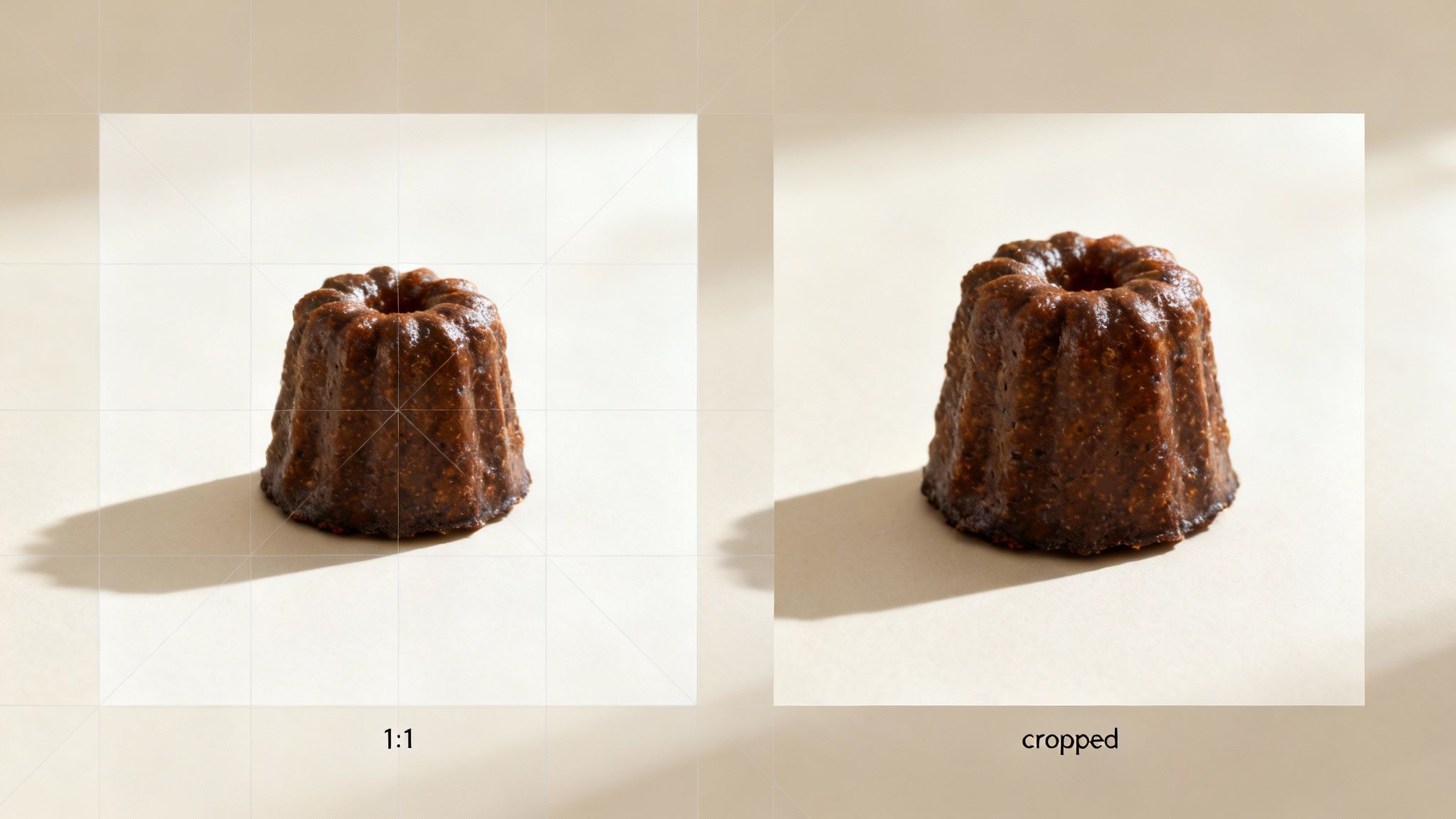
When you upload non-square images (e.g., vertical 3:4, landscape 4:3), Amazon forces them into a square container anyway. This occurs in search results, the main image gallery, and most critically, on mobile devices. The result is a visual disaster.
- Awkward Cropping: Key product features are often cut off.
- Wasted Space: Unprofessional white bars appear on the sides or top and bottom. Your product looks small and amateurish next to competitors who fill the entire frame.
- Lower Click-Through Rate (CTR): A poorly framed image in search results looks unprofessional and gets ignored. You lose the click before the shopper even sees your listing.
By adhering strictly to a 1:1 aspect ratio on a 2000 x 2000 pixel canvas, you guarantee your product is the hero of the shot. It will look consistent and professional on every device, every time.
Avoiding Common Image Rejection and Suppression Issues
A suppressed listing is a dead end: zero sales, wasted ad spend, and destroyed sales velocity. The most frustrating part? The vast majority of suppressions stem from simple, automated image violations.
Ignoring these rules isn't a risk—it's a guarantee your listing will be pulled from search results, often without warning. Understanding what triggers Amazon’s bots is the only way to keep your products visible and selling.
Diagnosing Suppression Triggers
Amazon’s bots are unforgiving, especially with the main image. A single mistake can make your product disappear. Before contacting Seller Support, learn to diagnose the problem yourself by checking for these common violations.
- Non-White Background: The main image background must be pure digital white: RGB 255, 255, 255. No exceptions. Off-white, light grey, or a photo of a white backdrop with shadows will trigger a suppression.
- Unauthorized Text or Logos: The main image must be sterile. Any added text like "Made in USA" or "2-Pack," brand logos, or promotional badges are strictly forbidden. The bots will find them.
- Low-Resolution Images: If your image's longest side is under 1000 pixels, it is at risk. Amazon enforces this to ensure a baseline quality and functional zoom.
- Illustrations or Placeholders: Your main image must be a real photograph of your product. Using a 3D render, a drawing, or a placeholder graphic is a fast track to rejection.
Critical Takeaway: Amazon's suppression system is automated. It doesn't care about your intentions; it scans for technical compliance. If your main image fails on any of these points, your listing gets shut down. Fixing the image is almost always the solution.
A Tactical Correction Process
When a listing is suppressed, panic is counterproductive. Fast, methodical action protects your revenue and ranking. Arguing with Seller Support is a waste of time when you can usually fix the issue in minutes.
Follow this process to get your product back online.
- Identify the Violation: In Seller Central, go to the "Manage Inventory" page. Suppressed listings are typically marked with a red or yellow icon. Click it, and Amazon will state the specific reason, which almost always points to an image rule.
- Correct the Offending Image: Do not just tweak the old file. Start fresh. Open your original source file and create a new version that is 100% compliant. If the background was the issue, create a perfect RGB (255, 255, 255) cutout. If it was text, remove it completely.
- Replace the Image: In your listing editor, go to the "Images" tab and upload the corrected file. It is best practice to delete the old, non-compliant image entirely before uploading the new one to avoid caching issues.
- Verify the Update: After saving, wait 15-30 minutes. Clear your browser cache and check the live product page. The suppression flag in Seller Central should disappear, and your listing should be active again.
Mastering this workflow means you stop depending on Seller Support and take back control. Every hour your product is suppressed is an hour of lost sales—a cost that is entirely avoidable.
Optimizing Your Images for Mobile Conversion
The majority of your Amazon traffic is on a phone. If your images aren't designed for a small screen, you are losing sales. A mobile-first image strategy is non-negotiable for any serious seller.
Mobile shopping is fast and ruthless. Buyers scroll, making snap judgments based on what they can see and understand in seconds. This punishes complexity and rewards instant clarity. For every image, this means large, legible text, a clear visual hierarchy, and one single, focused message.
Why Desktop Infographics Fail on Mobile
The classic, data-heavy infographic that works on a large monitor is a conversion killer on mobile. Jamming multiple bullet points, tiny icons, and paragraphs of text into one image creates an unreadable mess on a five-inch screen.
Shoppers will not pinch and zoom to decipher your infographic. They will just scroll to a competitor with clearer visuals. The goal isn't to cram every feature into one image; it's to communicate the single most compelling benefit in under three seconds.
Instead of one overloaded image, break your key selling points into multiple, digestible slides. Each secondary image needs to have one job and one message. Period.
A Framework for Mobile-Optimized Images
To build images that convert on mobile, every visual element must be deliberate. Your entire focus should be on immediate comprehension. A confused mind never buys.
Follow these principles to ensure your images work where it matters most:
- One Idea Per Image: Dedicate each image slot to a single benefit or feature. Highlighting durability? Show the product in a rugged setting. Is it easy to assemble? Show a simple three-step visual.
- Large, Contrasting Text: Use a bold, clean font large enough to be read without squinting. Ensure your text has high contrast against the background—think white text on a dark overlay, or vice versa. Limit text to a headline and maybe a short sub-point. No more than 5-10 words total.
- Clear Visual Hierarchy: Guide the viewer's eye. The product or the key benefit must be the most prominent element. Use arrows or callouts sparingly to highlight specific details without creating clutter.
- Focus on the Benefit, Not the Feature: Don't just list a feature like "10,000 mAh Battery." Translate that into what the customer gets: "All-Day Power for Work and Play."
This mobile-first approach forces ruthless clarity in your messaging. It taps directly into the psychology of the mobile shopper, removing friction and building the confidence needed to drive add-to-carts from your largest audience segment.
Your Final Pre-Upload Image Checklist
A final quality check before uploading is your last line of defense. It separates a listing that thrives from one that gets suppressed, wasting ad spend and momentum. This checklist turns a stressful guessing game into a simple, repeatable workflow.
This isn’t just about double-checking your work. It’s a strategic step to confirm every image is primed to convert, satisfying both Amazon’s algorithm and your customer. You are systematically eliminating common errors and maximizing the selling power of your visuals from the moment they go live.
The Ultimate Amazon Image Pre-Upload Checklist
Use this table to verify every critical point. Do not skip a single item—each check prevents a specific, costly problem.
| Verification Category | Checkpoint Item | Status (Pass/Fail) |
|---|---|---|
| Main Image | Is the background pure digital white (RGB 255, 255, 255)? | |
| Does it show only the product, with zero props, text, or logos? | ||
| Does the product fill at least 85% of the frame? | ||
| Secondary Images | Is all infographic text crisp and easily readable on a small phone screen? | |
| Does each image communicate one single, focused benefit? | ||
| Does the entire image set feel consistent in style and branding? | ||
| Technical Specs | Is the longest side of every image at least 1600px (ideally 2000px)? | |
| Is every image a perfect 1:1 square to avoid awkward cropping? | ||
| Is every image saved as a high-quality JPEG (.jpg)? | ||
| Is the file saved in sRGB color mode for accurate web colors? |
Once every box is checked, you have done more than just follow rules. You have engineered a listing for performance.
Main Image Compliance
Think of your main image as the gatekeeper, judged harshly and automatically by Amazon’s bots. There is no room for creative interpretation. It must be technically perfect.
- Background Check: Is the background pure digital white? Not light grey, not off-white. It must be RGB (255, 255, 255).
- Content Check: Does the image show only the product for sale? No props, no text, no logos, no watermarks.
- Framing Check: Does your product fill at least 85% of the image frame? This is non-negotiable for visibility.
Secondary Image Strategy
If the main image earns the click, your secondary images earn the sale. Their job is to answer questions, build trust, and drive the "Add to Cart" decision. The single most important check is mobile clarity.
- Mobile Legibility: Is every word on your infographics large, sharp, and easy to read on a small phone screen? If you have to squint, it fails.
- Message Clarity: Does each image communicate a single, focused idea? Piling on features creates confusion. One benefit, one image.
- Visual Cohesion: Does the whole set look like it belongs together? The style, branding, and quality must be consistent.
Technical Specifications
Finally, a quick review of the file properties. These details impact everything from zoom functionality to your listing’s load speed.
- Pixel Dimensions: Is the longest side of every image at least 1600px? We strongly recommend 2000px for a crystal-clear zoom.
- Aspect Ratio: Is every image a perfect 1:1 square? This prevents Amazon from awkwardly cropping your shot.
- File Format: Is every image saved as a JPEG (.jpg)? This provides the best balance of quality and file size for fast loading.
- Color Mode: Is the file saved in sRGB color mode? This is the web standard and ensures your product colors are accurate.
By nailing these points, you aren’t just avoiding problems—you’re setting your listing up to win. If you need a complete, conversion-focused image set built on this level of strategic detail, you can order your professional Amazon product shots and have them ready in just a few days.
Frequently Asked Questions
Even with the official documentation, specific questions always arise. Here are direct answers to the most common sticking points sellers face with Amazon images.
What Is the Best Image Size for Amazon?
Amazon’s minimum is 1000 pixels on the longest side. Do not aim for the minimum. The best and most effective size is 2000 x 2000 pixels.
This square 1:1 format enables the crystal-clear zoom feature buyers rely on, which is a major factor in building trust and increasing conversions. It also ensures your product looks sharp and professional on every device, especially on mobile where the majority of shopping occurs.
Why Are My Amazon Images Being Suppressed?
Image suppression is almost always a main image violation. Amazon's algorithm is robotic and ruthless, typically flagging one of three mistakes:
- The background isn't pure white. It must be RGB (255, 255, 255). Even slightly off-white will be rejected.
- The image contains forbidden elements. Any text, logos, watermarks, or promotional badges on the main image will trigger an instant suppression.
- The resolution is too low. If the longest side of your image is under 1000 pixels, it will be rejected.
Correct your main image to be 100% compliant, and you will solve the vast majority of suppression issues without needing to contact Seller Support.
Should I Use JPEG or PNG for Amazon Images?
Always use JPEG (.jpg). This isn't a debate.
While Amazon accepts PNGs, JPEGs provide the optimal balance of high image quality and small file size. This is critical for page load speed, a metric that directly impacts both customer experience and your ranking in Amazon's algorithm. PNG files are unnecessarily large for product photos and offer no practical benefit in this context.
Can I Put Text on My Amazon Images?
Yes, but only on your secondary images. Never on the main one.
For your secondary images, text is a powerful conversion tool. Use it to call out key benefits, display dimensions, or create comparison charts that simplify the buying decision. The golden rule is to keep text large, clean, and instantly readable on a mobile screen.
Key Insight: Treat these rules as technical mandates, not friendly suggestions. Amazon's image compliance is run by bots that scan for perfection. Being off by a single pixel on your background color can get your listing pulled and halt your sales. Precision isn't just a good idea—it's mandatory.
If you have more complex questions or need a custom visual strategy, you can always reach out to our team for specific guidance.
At ProductShots, we build entire image sets based on deep research to address buyer objections and drive conversions, ensuring every image is perfectly compliant and optimized for performance. Get your research-driven Amazon images in 2-3 days.